Azure
Access your Azure instance via ExpressRoute Standard or Metro
Azure ExpressRoute Standard vs Metro
NL-ix offers both Microsoft Azure ExpressRoute Standard and Metro
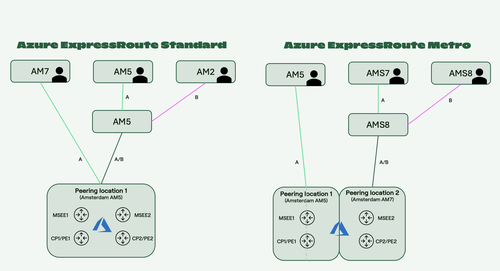
ExpressRoute Standard: A single VLAN-ID with two paths configured at a single Microsoft datacenter site with built-in redundancy.
ExpressRoute Metro: leverages physically and logically separated paths across two independent Microsoft infrastructures, ensuring greater fault tolerance and reducing single points of failure at Microsoft side. ExpressRoute Metro is designed to keep traffic strictly within a metro area, offering lower latency and a higher SLA by Microsoft versus ExpressRoute Standard.
| Datacenter location: | Available regions: | Fabric options: | Redundancy: | Supported bandwidths |
|---|---|---|---|---|
| Amsterdam | West Europe | A-A or A-B | Mandatory redundant |
Mbps 50, 100, 200, 500 Gbps 1, 2, 5, 10 |
| Amsterdam Metro | West Europe | A-A or A-B | Mandatory redundant |
Mbps 50, 100, 200, 500 Gbps 1, 2, 5, 10 |
| Dublin | North Europe | A-A or A-B | Mandatory redundant |
Mbps 50, 100, 200, 500 Gbps 1, 2, 5, 10 |
| Stockholm | Sweden Central | A-A | Mandatory redundant |
Mbps 50, 100, 200, 500 Gbps 1, 2, 5, 10 |
Note all products are available in all regions, check the actual status here
Order and provisioning process
The order and provisioning process for Microsoft Azure ExpressRoute contains the following steps:
- To deploy an ExpressRoute connection, the customer needs to choose the appropriate ExpressRoute Plan in the Azure portal, which generates a service-key which is shared with NL-ix
- NL-ix uses the service-key to 'accept' the ExpressRoute on our ports and state which VLAN is used for this connection
- The VLAN information is configured on the relevant (customer) ports and the information is shared with the customer.
- The customer sets up the correct BGP Peering in order to create a working connection.
More information on Azure Peering locations
For ExpressRoute Standard:
- Region North Europe: select Dublin2 as peering location and NL-ix as service provider
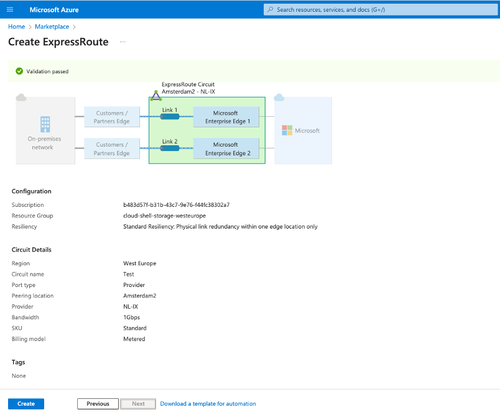
- Region West Europe: select Amsterdam2 as peering location and NL-ix as service provider
For ExpressRoute Metro:
- Region West Europe: specify Amsterdam Metro as peering location and NL-ix as service provider.
Azure Configuration Guide
In order to setup a working ExpressRoute, different resources need to be created in the Azure domain.
It is important that the ExpressRoute resource is created with the correct parameters. The resources Connection and (ExpressRoute) Gateway, are merely 'linking' resources and fall inside the customer domain.
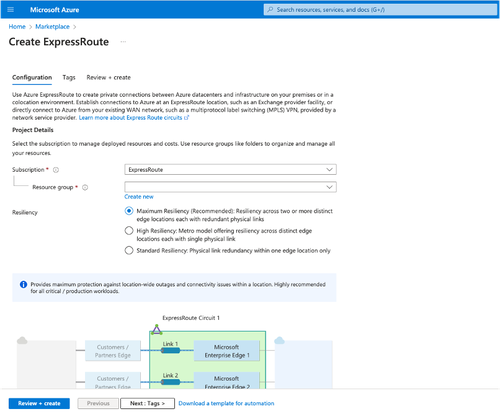
An ExpressRoute can be created via the Azure Portal or via the command line (cloud shell). In both cases, there are three properties that need to be set correctly. In the Azure Portal, these properties are found under the step Configuration:
- the Port Type needs to be set on Provider.
- the Provider needs to be set to NL-IX - available for Europe West or Europe North
- When choosing a provider, the next step is to pick the Peering Location
More information on Azure Peering locations
For ExpressRoute Standard:
- Region North Europe: select Dublin2 as peering location and NL-ix as service provider
- Region West Europe: select Amsterdam2 as peering location and NL-ix as service provider
For ExpressRoute Metro:
- Region West Europe: specify Amsterdam Metro as peering location and NL-ix as service provider.
NOTE: In case a different region-location combination is selected, it could be that the chosen location is used as a ramp-up; Microsoft in that case charges extra for sending the traffic over the Microsoft network to the correct region. For example, if the selected region is Europe North, but the Peering location is set to Amsterdam (which is a ramp-up for Europe West), the connection will be extended towards Europe North over the Microsoft network. This is an expensive option which is not recommended.